


User Guide: Embroidery Machine - Brother PE900
Description
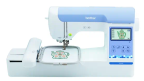
The Brother PE900 is an embroidery only machine for stitching designs onto fabric. The machine comes with 193 embroidery designs and 13 built-in embroidery fonts with a 5" x 7" maximum embroidery area. The machine includes on-screen editing, including letter editing, resizing, repositioning, and combining designs.
The library also offers Hatch Embroidery Composer 3 software, so you can edit your designs, lay them out in various ways, change stitch types, and more. It's recommended when using existing designs and adding lettering or monogramming. It does not include manual digitizing or digitizing appliqué.
Reserve
- At this time, the embroidery machine is available by appointment only. It's not available on a walk-in basis during Open Use Time. To make an appointment, please fill out the Book-A-Maker Appointment form.
- Book-A-Maker Appointments are open to Bloomingdale Public Library cardholders only. SAME DAY OR NEXT DAY APPOINTMENTS MAY NOT BE AVAILABLE. Please allow at least 2 business days for a reply.
- If you're unable to make your appointment, please email or call the staff member who contacted you. If you have multiple broken appointments without notice, staff will not accommodate future Book-A-Maker requests.
Embroidery Machine Reservation Rules
- Reservation limit of 2 hours per day max.
- Limit one reservation allowed per day.
- Reservation requests for the embroidery machine can be made up to 14 days in advance.
- All reservation requests are on a first-come, first-served basis. Note that embroidery machine availability is based on staff availability.
What We Provide - Makerspace Equipment & Materials
Makerspace equipment is free to use, but there is a cost for project materials and items. We provide the following:
- Embroidery Machine - Brother PE900
- Embroidery machine bobbins
- Embroidery machine needles
- Materials Available for Purchase - Unlike other Makerspace equipment, we require you to use our embroidery thread. No outside thread or glitter thread allowed. - 5¢/1000 stitches (various colors, cash only)
- Stabilizer (12" height, cash only)
- No Show Mesh Backing (Light Weight) - 2¢/inch
- No Show Mesh Backing Fusible Iron On (Light Weight) - 3¢/inch
- Cut Away (Medium Weight) - 2¢/inch
- Cut Away Fusible Iron On (Medium Weight) - 3¢/inch
- Tear Away (Medium Weight) - 2¢/inch
- Tear Away Adhesive (Peel and Stick) - 6¢/inch
- Tear Away Fusible Iron On (Medium Weight) - 3¢/inch
- Wash Away (Light Weight) - 3¢/inch
- Wash Away Topping Film - 2¢/inch
We also offer various sewing equipment and supplies:
- Sewing machines
- Hand sewing needles
- Irons, ironing boards
- Fabric scissors, rotary cutters, cutting mats, seam rippers
- Seam rolls
- Tailor's chalk, heat erase pens, water erasable pens, air erasable pens
- Sewing gauges, rulers, measuring tape
- Quilting ruler - Creative Grids Stripology Squared Quilt Ruler - 14-1/2" x 17-3/4" (slits are 14-3/4" long)
- Quilting rulers - ARTEZA Acrylic Quilters Rulers (Assorted Sizes) - 4.5" x 4.5", 6" x 6", 6.5" x 24", 9.5 x 9.5", 12.5" x 12.5"
- Pins, sewing clips
- Fabric hole punchers
- Light box/pad for weeding vinyl, drawing/tracing, diamond painting, embroidery tracing, and related craft projects
What You Must Bring - Materials & Items
To use this equipment, you must bring the following:
- Project materials - Fabric or other material for project. Note that we don't allow embroidery on curved items like hats or pockets. All items should be able to be laid flat for hooping.
- Cash for embroidery thread usage and stabilizer
- Optional: Stabilizer. The library also sells a variety of stabilizer.
Learn
Print Guides:
- Instruction Book
- Quick Reference Guide
- Embroidery Design Guide (designs and fonts installed on the embroidery machine)
Websites/Videos:
- Machine Embroidery Guide from r/Machine_Embroidery
- Embroidery Legacy YouTube
- Romero Threads YouTube
Tips
- Use the Makerspace's AccuQuilt to cut fabric for quilts and sewing projects.